STM32Cube HAL Deep Dive: Hero or Villain for Developers?

STM32Cube HAL Deep Dive: Hero or Villain?
Hello, 123Micro readers! It’s your instructor here. Today, we are dissecting the tool that acts as your personal translator between your logic and the silicon: the STM32Cube HAL (Hardware Abstraction Layer).
From various datasheets and community discussions, the HAL Library is often a topic of heated debate. Is it a bloated mess, or a productivity savior? This guide cuts through the noise to give you the “Bird’s-eye view” before you start chopping down trees.
Difficulty: ⭐⭐ (Essential Theory)
Reading Time: 10 Minutes
1. What is STM32Cube HAL? (The Big Picture)
Before 2014, STMicroelectronics provided the Standard Peripheral Library (SPL). While useful, it lacked standardization across different chip families. Migrating code from an F1 to an F4 series was a nightmare.
Enter STM32Cube HAL. ST re-engineered this to be a universal standard focused on Portability. The goal is simple: write code for an STM32F4, and with minimal changes, run it on an STM32L4.
The Abstraction Ladder
Where does HAL sit in the ecosystem?
- High Level (HAL): Easiest to write, rich with ready-made functions, but introduces slight overhead and higher memory footprint.
- Low Layer (LL): The middle ground. Fast, almost as efficient as direct register access, but harder to read and less feature-rich than HAL.
- Bare-Metal (Registers): The hardest path. Requires deep datasheet knowledge but yields maximum performance.
2. Core Architecture of HAL
According to the “Description of STM32F4 HAL” and reference texts like Mastering STM32, HAL uses an Object-Oriented approach (implemented in C). To master it, you must understand these three pillars:
2.1 The Handle (HandleTypeDef)
Think of this as the “ID Card” for your peripheral. HAL enforces the use of structures ending in _HandleTypeDef (e.g., UART_HandleTypeDef, TIM_HandleTypeDef).
- Role: It stores the Configuration, Current State, and Error Codes. This allows the HAL to manage multiple instances of the same peripheral without conflict.
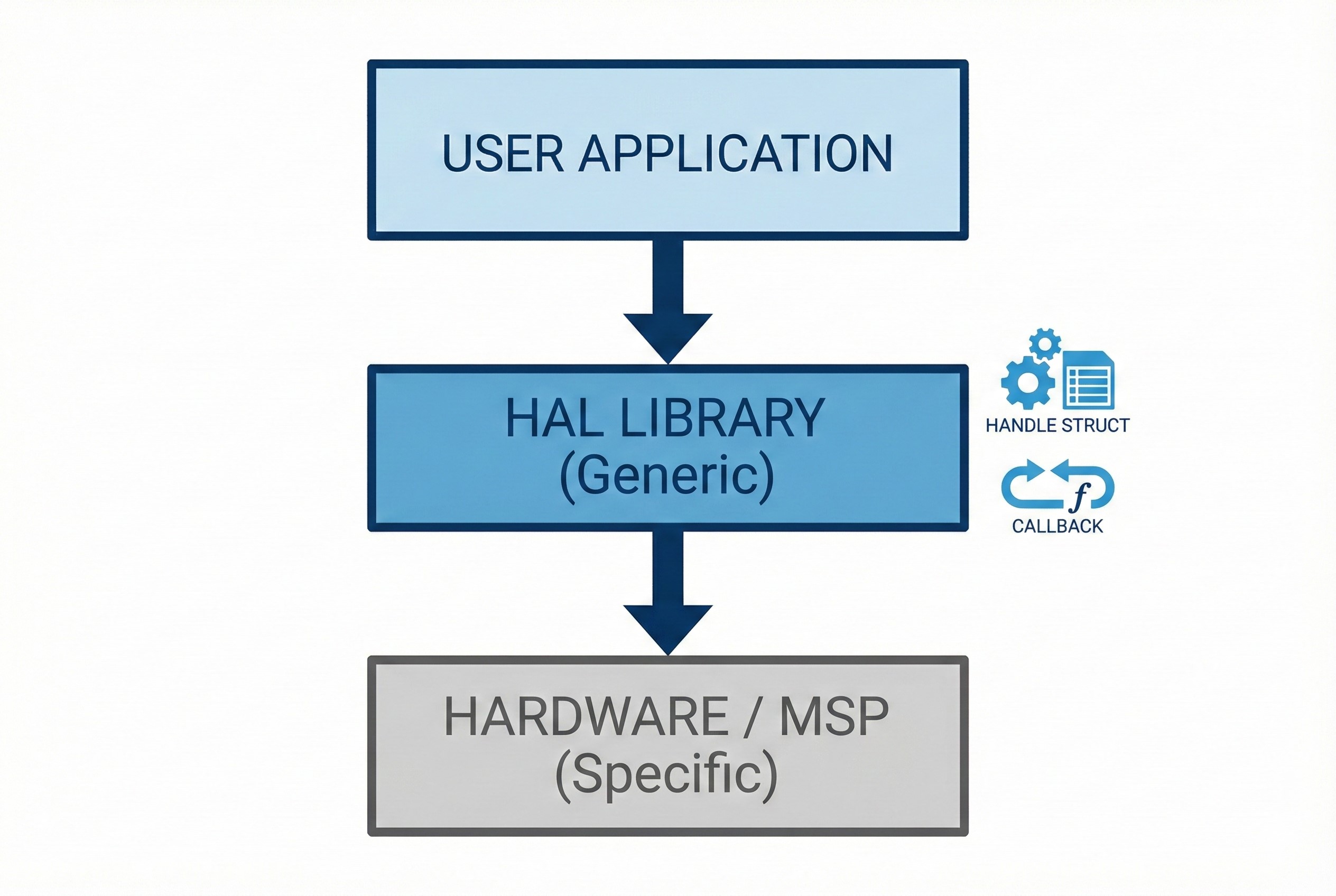
2.2 MSP (MCU Support Package)
This is where beginners often get confused. When you call HAL_UART_Init(), the HAL library secretly calls a “hidden” function named HAL_UART_MspInit().
- Why separate them? HAL keeps the main logic Generic. The hardware-specific details—like which GPIO pin is TX/RX or which RCC Clock to enable—are offloaded to
stm32f4xx_hal_msp.c. This separates logic from hardware dependencies.
2.3 Callback Functions
Instead of polling registers in a while loop, HAL utilizes an event-driven model via Callbacks (declared as __weak functions). When a transfer is complete or an error occurs, the system automatically jumps to your custom callback function.
3. The Double-Edged Sword (Pros & Cons)
Referencing “Hands-On RTOS”, here is the honest verdict:
The Good 👍
- Time-Saver: When paired with STM32CubeMX, initialization code is generated instantly.
- RTOS Ready: Designed to be thread-safe (mostly) and includes built-in timeout mechanisms to prevent system hangs.
- Complex Peripherals: implementing USB or Ethernet stacks from scratch (Bare-metal) takes months. With HAL, it takes minutes.
The Bad 👎
- Bloat & Latency: To maintain generic compatibility, HAL performs excessive error checking and resource locking, which can slow down critical loops.
- Abstraction Leaks: It hides too much. New developers might “drive the car” without understanding how the engine works.
- Bugs: Historically, some HAL versions contained bugs or incomplete documentation, leading to confusion.
4. Instructor’s Verdict
Here is my advice for 2026 development:
- For Beginners: Use HAL! Getting an LED to blink or UART to transmit in 5 minutes builds momentum. Don’t let optimization premature kill your enthusiasm.
- For Production: HAL is perfectly fine for 90% of the code. However, for time-critical sections (like high-frequency motor control or fast ADC sampling), mix in LL (Low Layer) drivers or direct Register access.
- Troubleshooting: If HAL behaves strangely, always check
stm32f4xx_hal_conf.hto ensure modules are enabled, and verify your GPIO assignments in the_msp.cfile.
Hopefully, this guide clears up the fog around STM32Cube HAL. Now, let’s get coding!