STM32CubeIDE Deep Dive: The Ultimate All-in-One Tool for Modern Embedded Devs

STM32CubeIDE: The New Standard for Embedded Development
Welcome back, developers and makers! Today, we are stepping into our digital workshop to examine the most critical tool in our arsenal: the IDE (Integrated Development Environment).
If you programmed STM32 chips 5-10 years ago, you might remember the fragmented workflow: using STM32CubeMX to generate initialization code, and then switching to a separate, often expensive compiler like Keil MDK or IAR to build the project.
Those days are over. Today, we are diving deep into STM32CubeIDE, the tool that has unified the STM32 ecosystem. Let’s analyze what it is, how it works, and why it is the best starting point for modern embedded engineering.
1. The Paradigm Shift: From Fragmented to Unified
In the past, the professional embedded workflow was split into two distinct phases:
- Hardware Configuration: Using STM32CubeMX to set up Pinout and Clock configurations.
- Coding & Debugging: Using proprietary IDEs like Keil uVision or IAR Embedded Workbench. While these tools produce highly optimized code, they come with a hefty price tag (thousands of dollars) or restrictive code-size limits on their free versions.
Enter STM32CubeIDE. STMicroelectronics changed the game by acquiring Atollic (creators of TrueStudio) and merging it with the STM32CubeMX engine. The result is a powerful All-in-One solution that handles everything from pin configuration to flashing the chip.
Instructor’s Note: The biggest advantage here is that it is Free and Unlimited. There are no code size limits, making it perfect for startups, students, and professional engineers alike.
2. Under the Hood: The Architecture
If we dissect STM32CubeIDE, we find it isn’t a proprietary black box, but a combination of three industry-standard open-source technologies:
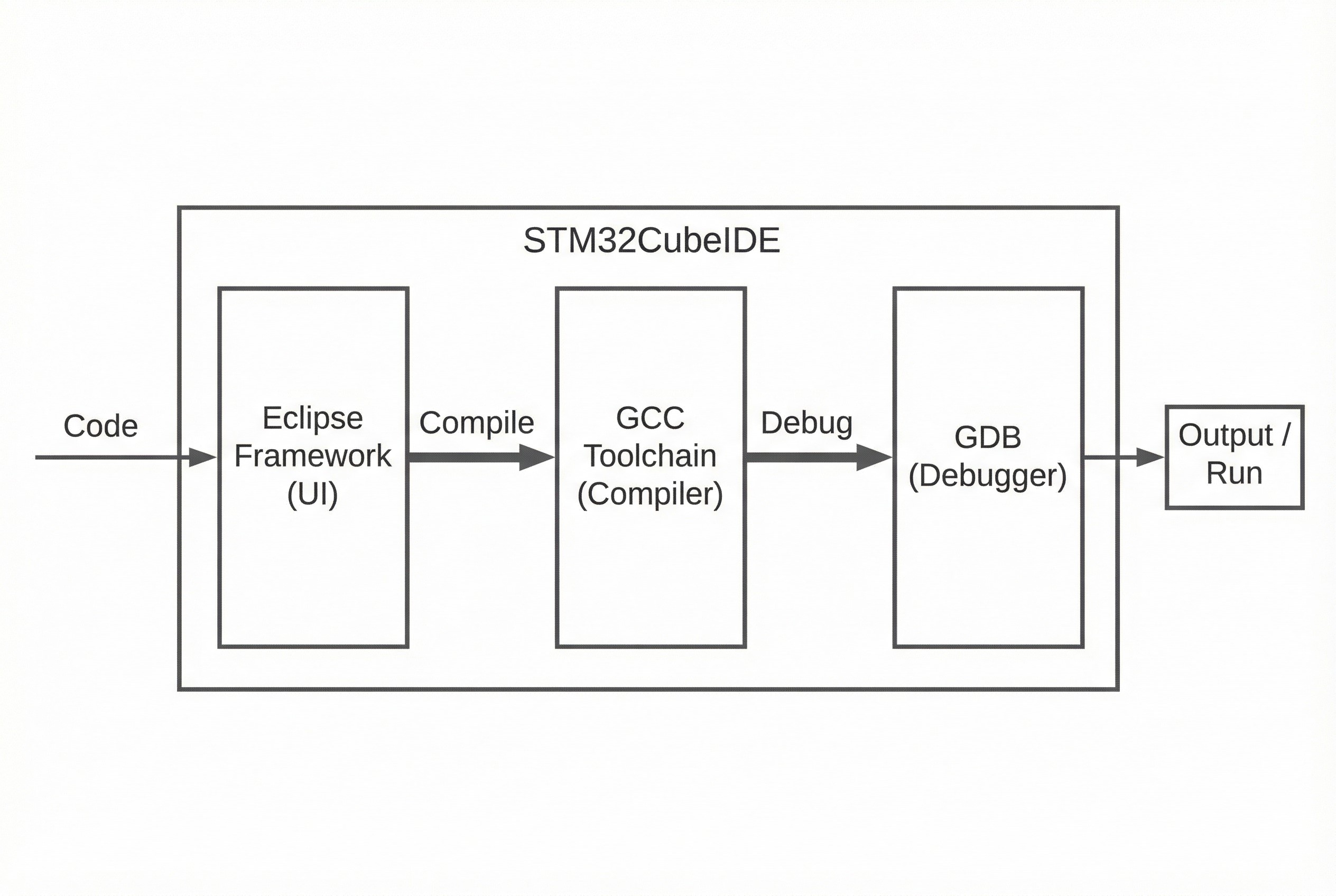
- Eclipse Framework: The core UI is built on Eclipse, the gold standard for open-source IDEs. This ensures a familiar interface and access to a vast ecosystem of plugins.
- GCC Toolchain: It uses the GNU ARM Embedded Toolchain to compile your C/C++ code. This is free, robust, and widely used in the industry.
- GDB Debugger: The standard for debugging, supporting both ST-LINK and SEGGER J-Link probes.
This architecture makes STM32CubeIDE a true Cross-Platform Tool, running natively on Windows, Linux, and macOS.
3. Beyond Just “Coding”
STM32CubeIDE is more than just a text editor with a “Compile” button. It includes advanced analysis tools integrated directly into the workflow:
- Integrated CubeMX: You can open the
.iocfile directly within the IDE to modify pins or clocks. When you save, it auto-generates the C code without you ever leaving the window. - Build & Stack Analyzer: A static analyzer view shows exactly how much Flash and RAM your code consumes, helping you catch memory leaks or stack overflows early.
- Advanced Debugging (SWV): The Serial Wire Viewer allows you to trace variables in real-time and use
printfredirection via the ST-Link cable, eliminating the need for a separate USB-UART adapter. - RTOS Aware: If you are using FreeRTOS or Azure RTOS, the IDE provides dedicated views to monitor task states and stack usage.
4. The Verdict: CubeIDE vs. The Rest
How does it stack up against the competition?
| Feature | STM32CubeIDE | Keil / IAR | VS Code / Eclipse (Raw) |
|---|---|---|---|
| Cost | Free (Unlimited) | Expensive / Restricted | Free |
| Setup | Easy (All-in-One) | Moderate | Difficult (Manual Config) |
| Compiler | Good (GCC) | Excellent (Proprietary) | Good (GCC) |
| OS Support | Win / Mac / Linux | Windows Focused | Win / Mac / Linux |
| Best For | General Use / STM32 | Safety Critical / Legacy | Hardcore Customization |
5. Instructor’s Recommendation
For this series and for most modern development scenarios, STM32CubeIDE is the superior choice.
It offers official support from ST, meaning you get the latest chip definitions and libraries immediately. The community is vast, so troubleshooting is easier. Most importantly, it removes the friction of toolchain setup, allowing us to focus on what matters: Writing great Embedded C code.
Get your installation ready, and I will see you in the next practical lab! 🚀