Size of Pointers in C: The Memory Footprint Every Hardware Engineer Must Understand

Size of Pointers in C: Unveiling the Memory Footprint
Hello embedded engineers and developers of the 123microcontroller community! Welcome back to another technical deep dive.
When we start learning C programming, we quickly memorize data type sizes: a char consumes 1 byte of memory, and an int might consume 2 or 4 bytes depending on the chip architecture. But what about “Pointers”? How much RAM does a pointer variable actually consume?
Many beginners logically assume, “If a pointer points to a 1-byte char, the pointer itself must be 1 byte.” …This is a very classic misconception!
Today, we are going to dissect the “Size of Pointers” in the context of C fundamentals. We will explore exactly how much space a pointer consumes, why it differs between your PC and a microcontroller board, and how to manage pointer sizes to ensure your code is 100% portable across all platforms without crashing. Let’s dive in!
Unraveling the Mystery of Pointer Sizes
At a structural level, a pointer is simply a variable that stores a “Memory Address.” Expert system architects explain the mechanics of pointer sizes as follows:
1. Architecture-Dependent Size
The size of a pointer does NOT depend on the data type it points to. Instead, it is strictly dictated by the “System Architecture and Compiler Memory Model.” For example:
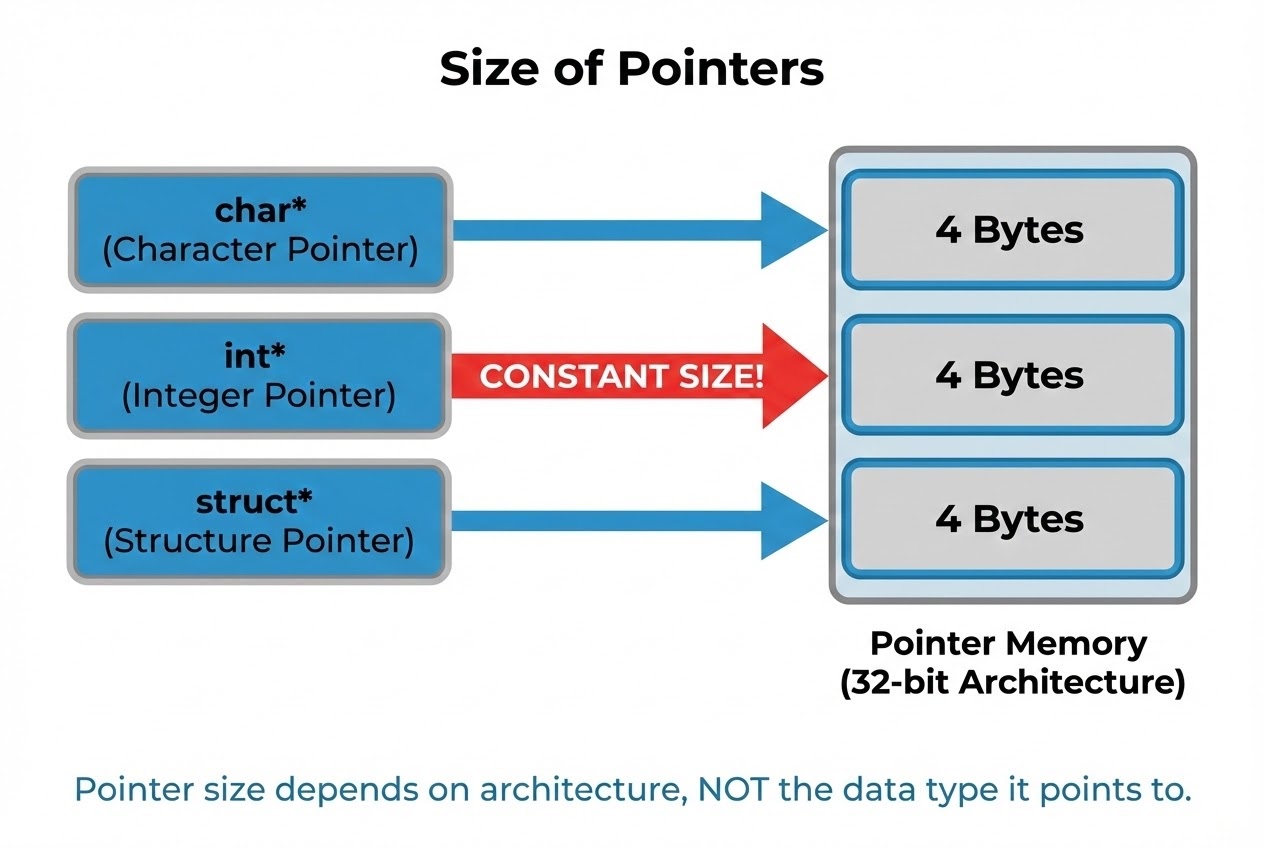
- On a 32-bit system (like a standard ARM Cortex-M microcontroller), the size of any pointer is always 4 bytes (32 bits). This provides enough bits to address the entire 4GB memory map.
- On a 64-bit system (like modern PCs), the size of a pointer jumps to 8 bytes (64 bits) to cover a vastly larger memory space.
2. Data Type Has No Effect on Pointer Size
Whether you declare a char *, an int *, a float *, or even a pointer to a massive struct, these pointer variables will all consume exactly 4 bytes (on a 32-bit system)! The reason is simple: a “House Number” (Address) always has the same format and size, regardless of whether the house itself is a tiny shack (char) or a massive mansion (struct).
3. The Embedded Exception: Harvard Architecture
Hardware developers must be extremely careful here! On microcontrollers utilizing a Harvard Architecture (such as the classic 8051 or AVR families), Program Memory (ROM/Flash) and Data Memory (RAM) are physically separated. Consequently, pointer sizes might not be uniform. A Function Pointer (pointing to ROM) might have a different size than a Data Pointer (pointing to RAM). On some specific 8-bit chips, pointer sizes can bizarrely range from 1 byte up to 4 bytes depending on the memory space they target.
4. The Standard Types for Safely Storing Pointers
Since pointer sizes are unpredictable across platforms, how do we safely store a raw memory address in an integer variable? The C standard (C99) introduced special data types in <stdint.h>: intptr_t and uintptr_t. These types are guaranteed by the compiler to be “large enough” to hold a pointer’s address on the target system without any data loss.
Code Example: Proving Pointer Sizes
Let’s look at a clean C code snippet using the sizeof operator to prove that pointer sizes are completely independent of their destination data types.
#include <stdio.h>
#include <stdint.h> /* Required for intptr_t and uintptr_t */

/* Create a mock large structure */
typedef struct {
    int id;
    double values[10]; /* Array to make the struct physically large */
    char name[20];
} SensorData;

int main(void) {
    /* Declare various types of pointers */
    char *char_ptr = NULL;
    int *int_ptr = NULL;
    SensorData *struct_ptr = NULL;

    /*
     * 1. Use sizeof to inspect the size of the pointers themselves.
     * 🛡️ Notice the use of '%zu', which is the correct format specifier for size_t.
     */
    printf("--- Size of Pointers ---\n");
    printf("Size of char pointer   : %zu bytes\n", sizeof(char_ptr));
    printf("Size of int pointer    : %zu bytes\n", sizeof(int_ptr));
    printf("Size of struct pointer : %zu bytes\n", sizeof(struct_ptr));
    printf("Size of void pointer   : %zu bytes\n", sizeof(void*));

    /*
     * 2. Safely storing an Address in an integer variable.
     * NEVER use a standard 'int'. Always use intptr_t or uintptr_t.
     */
    int sensor_val = 100;
    int *pi = &sensor_val;

    uintptr_t safe_address = (uintptr_t)pi;
    printf("\n--- Storing Pointer Safely ---\n");
    printf("Address stored in uintptr_t: 0x%zX\n", safe_address);

    return 0;
}
(If you run this code on a 64-bit PC, it will print 8 for all pointer sizes. If cross-compiled and run on a 32-bit ARM board, it will print 4.)
Best Practices & Fatal Pitfalls
Managing pointer sizes is a minefield. Secure Coding guidelines and experts frequently warn against these specific traps:
- NEVER Cast a Pointer to a Standard
int: This is the #1 bug when porting legacy 32-bit code to a 64-bit system! If you executeint tmp = (int)pi;on a 64-bit system, yourintmight only be 4 bytes, while the pointer is 8 bytes. The result? Half of your memory address is instantly truncated and lost forever! Casting it back to a pointer and dereferencing it will cause a catastrophic crash. Fix: Always useintptr_toruintptr_t. - Using
sizeof()Correctly inmalloc: When dynamically allocating memory, you must request the size of the Data, not the Pointer. You should writemalloc(10 * sizeof(int)), notmalloc(10 * sizeof(int*))(unless you are intentionally creating an array of pointers). - The Array Decay Trap: When you pass an array into a function, it “decays” into a pointer. If you call
sizeof(array)inside that function, it will return the size of the pointer (4 or 8 bytes), NOT the total size of the original array! - Function Pointers on Harvard Architectures: On chips like the 8051 or AVR, never assume you can safely cast a Function Pointer to a Data Pointer. Their sizes might be fundamentally different, and accessing ROM vs RAM requires entirely different Assembly-level instructions.
Conclusion
In summary, the Size of a Pointer does NOT depend on the type of variable it points to; it is dictated entirely by the Hardware Architecture and Memory Model. Understanding that a pointer is 4 bytes on a 32-bit system and 8 bytes on a 64-bit system will help you decipher compiler warnings about Data Truncation and allow you to design highly optimized Data Structures.
Are you currently struggling with passing pointers between functions, or have you recently hit a blue screen while porting 32-bit code to 64-bit? Don’t forget to drop by, share your code, and discuss with us on the www.123microcontroller.com community board! See you in the next article. Happy Coding!