Hosted Environment & RTOS: Giving Your C Code Wings with an Operating System

Hosted Environment & RTOS: Giving Your C Code Wings
Hello embedded engineers and developers of the 123microcontroller community! Welcome back to another technical deep dive.
In our previous article, we navigated the rugged terrain of the Freestanding Environment—writing bare-metal code with no Operating System (OS) in sight. Today, we are flipping the coin to explore the other side of the C programming world: the Hosted Environment.
As your embedded projects grow in complexity, managing every single hardware register and software loop manually can quickly turn your codebase into spaghetti. Bringing an Operating System or an RTOS (Real-Time Operating System) into the mix as a “manager” is the industry-standard solution. Let’s dive deep into what a Hosted Environment actually is, the role of an OS/RTOS, and the superpowers your code gains when it has a supervisor!
The Realm of Hosted Environments and OS
The C standard explicitly defines the execution environments. The Hosted Environment is expansive and offers profound capabilities:
1. Operating System Support
A Hosted Environment means your C program does not run in isolation. It is supported by an Operating System running in the background. The OS acts as a “General Manager,” controlling the underlying hardware, allocating memory, and acting as the middleman for Input/Output (I/O) operations.
2. The Full Standard Library
The biggest perk of a Hosted Environment is having access to the entire C Standard Library. Whether it’s file manipulation (<stdio.h>), dynamic memory allocation (malloc() in <stdlib.h>), or string handling (<string.h>), these are fully available. In a freestanding bare-metal world, these luxuries are often absent.
3. Entry at main() and Environment Variables
In a Hosted Environment, the execution strictly begins at the main() function. Furthermore, the OS can pass initial configuration data known as Environment Variables to your program via arguments (argc, argv, envp) or through the getenv() function. This allows your program to be context-aware right from startup.
4. Enter the RTOS (Real-Time Operating System)
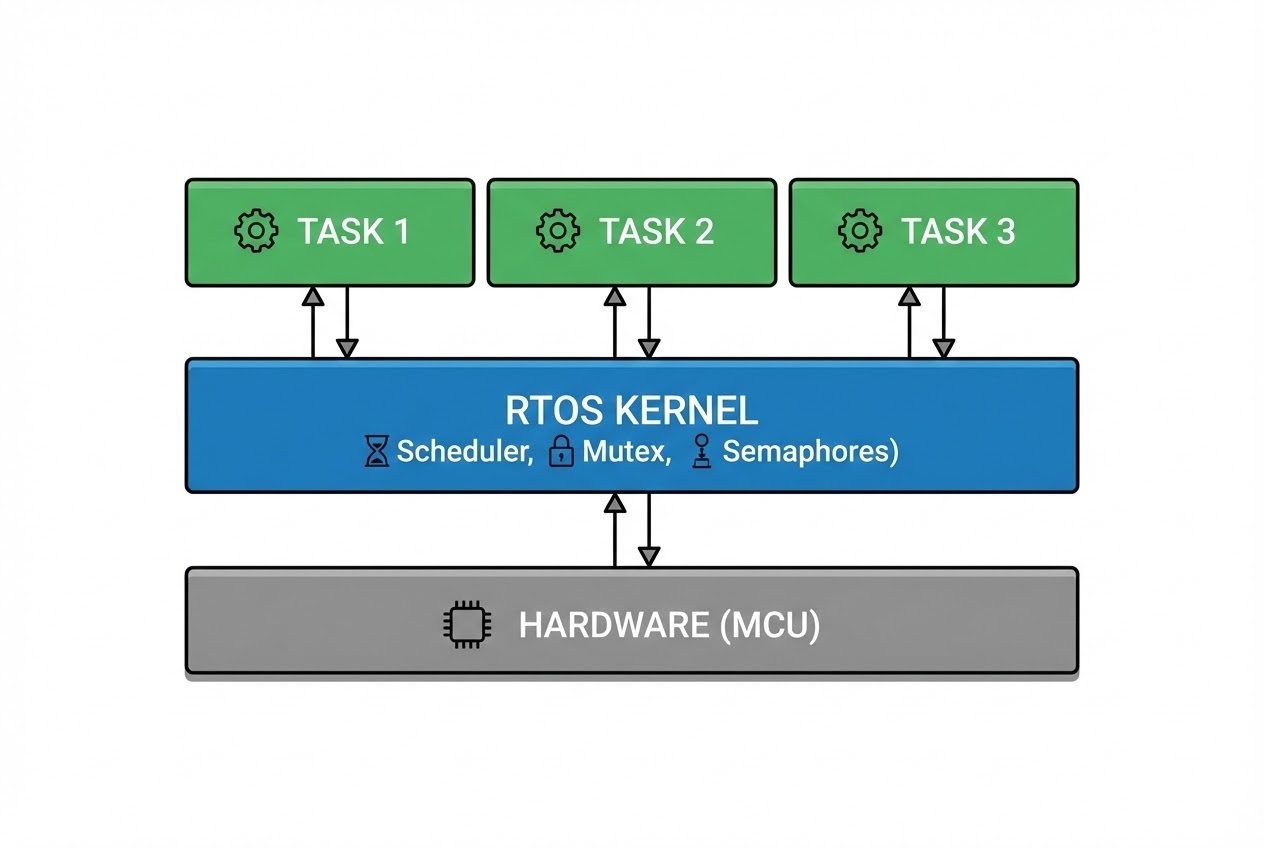
In Embedded Systems, we rarely use massive desktop OSs like Windows or Linux (unless using high-end Application Processors). Instead, we rely on an RTOS. An RTOS is a lightweight OS designed for strict “Real-time constraints.” It introduces a Multitasking Environment, allowing us to break down our application into smaller Tasks (or Threads) that appear to run concurrently. The RTOS handles the Scheduler, CPU Context Switching, and Inter-Task Communication.
Code Example: Hosted Environment & RTOS Simulation
Let’s look at a clean C code snippet that checks for a hosted environment, retrieves an environment variable, and demonstrates the structure of an RTOS task.
#include <stdio.h>
#include <stdlib.h>
#include <stdbool.h>

/*
 * 1. Check if we are in a Hosted Environment using the Preprocessor.
 * __STDC_HOSTED__ evaluates to 1 if an OS is supporting us.
 */
#if __STDC_HOSTED__ == 1
    #define ENVIRONMENT_MODE "Hosted (OS Supported)"
#else
    #define ENVIRONMENT_MODE "Freestanding (Bare-metal)"
    #error "This code requires a Hosted Environment to run!"
#endif

/*
 * 2. Simulating an RTOS Task structure.
 * In an RTOS, each Task behaves like it has its own mini main() loop.
 */
void sensor_task(void *argument) {
    while (true) {
        // Read sensor data...

        // rtos_task_delay(100); // 🛡️ Yield CPU to allow other Tasks to run
    }
}

/*
 * 3. The entry point in a Hosted Environment is always main().
 */
int main(int argc, char *argv[]) {
    printf("System is running in: %s\n", ENVIRONMENT_MODE);

    /*
     * 4. Fetching Environment Variables from the OS.
     * The OS passes configurations via getenv() from <stdlib.h>.
     */
    char *path_var = getenv("PATH");
    if (path_var != NULL) {
        printf("Current OS PATH is: %s\n", path_var);
    } else {
        printf("PATH variable not found.\n");
    }

    /* Simulating RTOS initialization (Creating a task and starting the scheduler) */
    // rtos_task_create(sensor_task, "SensorTask", ...);
    // rtos_start_scheduler();

    /* In a Hosted Environment, the program returns an exit status to the OS */
    return EXIT_SUCCESS;
}
Best Practices & Hidden Pitfalls
While having an OS or RTOS is incredibly convenient, software architecture experts and secure coding guidelines (like CERT C) warn about several critical pitfalls:
- Never Modify the Environment Pointer (ENV31-C): Functions like
getenv()return a pointer to memory managed by the OS. Modifying the string at this pointer results in Undefined Behavior. If you need to change an environment variable, use OS-specific APIs like POSIX’ssetenv(). - The API Nightmare (Vendor Lock-in): Unlike standard OSs that follow POSIX, RTOSs (like FreeRTOS, Zephyr, Micrium) often have completely different APIs for creating tasks or semaphores. Good software engineers mitigate this by building an OSAL (OS Abstraction Layer) wrapper, allowing you to swap out the underlying RTOS in the future without rewriting your core logic.
- Context Switch Overhead: Letting an RTOS schedule tasks comes at a cost. Every time a context switch occurs, the OS must pause, push the current CPU registers to the Stack, and pop the next task’s registers. If your RTOS Tick rate is too high, the CPU might spend more time switching contexts than executing actual application code!
- The Danger of Shared Resources: When multiple tasks run concurrently and attempt to access the same global variable or hardware peripheral, Race Conditions occur. In a Hosted Environment, you must strictly use synchronization primitives like Mutexes or Semaphores provided by the OS to lock access.
Conclusion
A Hosted Environment is a world where your C program is well-cared for by an OS or RTOS. It manages the hardware background, provides a comprehensive standard library, and offers task scheduling. This makes developing complex, real-time applications vastly easier, provided you carefully manage system overhead and shared resources.
If you are currently choosing your first RTOS (whether it’s FreeRTOS, Zephyr, or eCos) and running into issues with task stack sizes or bizarre bugs from shared variables, don’t forget to drop by, share your code, and discuss with us on the www.123microcontroller.com community board! See you in the next article. Happy Coding!