Pointers in C: A Deep Dive into the 'Fundamentals and Anatomy' of the Hardware Engineer's Secret Weapon

Pointers in C: Fundamentals and Anatomy
Hello embedded engineers and developers of the 123microcontroller community! Welcome back to another technical deep dive.
When we step into the world of low-level C programming—whether it’s talking directly to hardware registers or managing dynamic memory—there is one concept we absolutely cannot escape: Pointers. Many developers have experienced headaches dealing with them, but trust me, pointers are the very core that makes C so insanely powerful and fast.
Today, we are going to decode the fundamental “anatomy and mechanisms” of pointers as explained by expert system programmers. We will build a rock-solid foundation before you deploy them in real-world applications. Let’s dive in!
The Anatomy and Fundamentals of a Pointer
In the context of memory management, experts break down the core components of a pointer as follows:
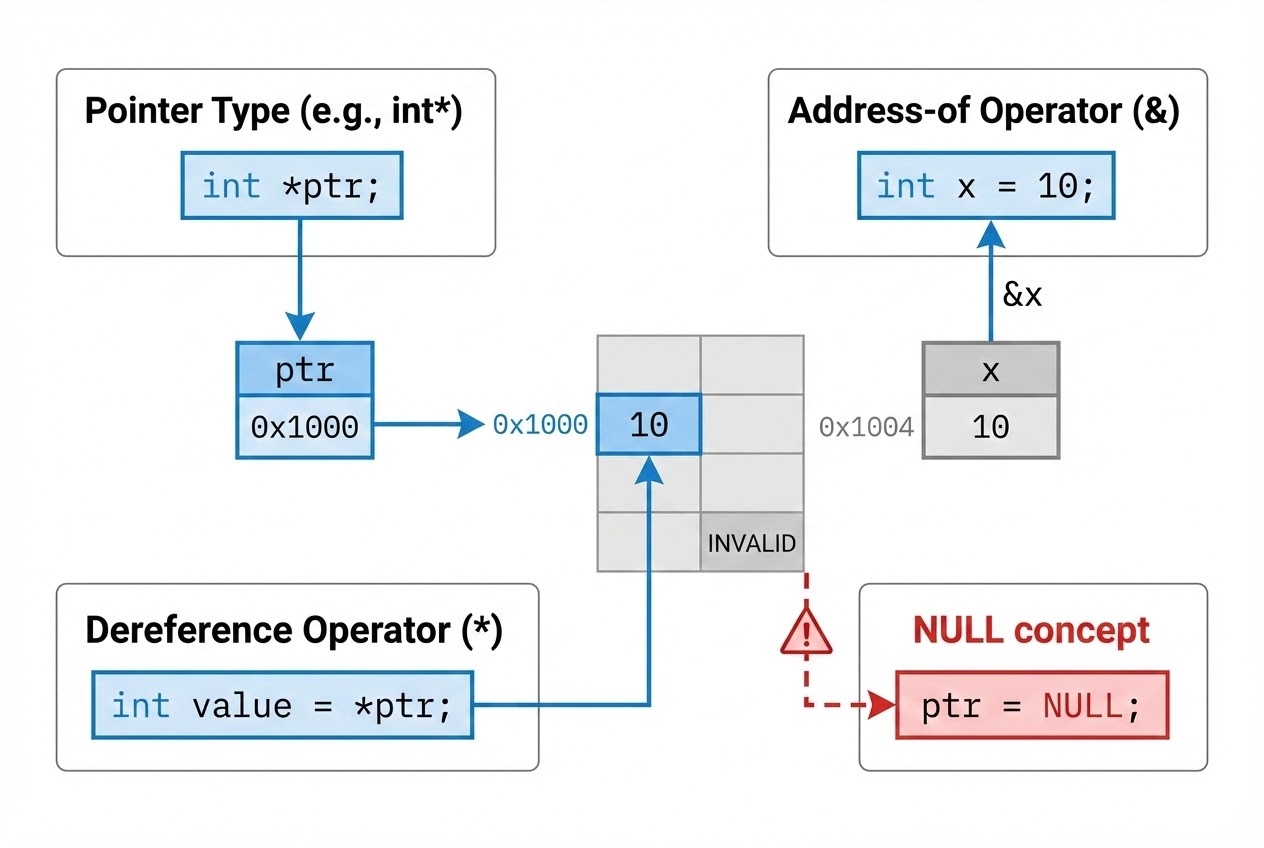
- What is a Pointer? (The Concept): Standard variables store data (like numbers or characters). A pointer, however, is a special type of variable designed strictly to store the “Memory Address” of another variable, object, or even a function. And because a pointer is a variable itself, it also consumes physical memory space to store that address.
- Pointer Size:
You might wonder, how much RAM does a pointer consume? The answer is: “It depends on the system architecture (Memory Models).” Generally, on a 32-bit system, all pointers (whether pointing to a
charor adouble) are 4 bytes in size. On a 64-bit system, they are typically 8 bytes. (Exceptions exist in special embedded architectures like Harvard architecture MCUs). - Why Do Pointers Have Data Types?
If an address is just a hex number, why do we need to declare it as
int *orchar *? The Data Type tells the compiler “how many bytes to read” when accessing that address. If you dereference anint *, the compiler fetches 4 bytes. If you use achar *, it fetches only 1 byte. The data type dictates the Data Interpretation of the raw memory. - The Operator Duo:
Working with pointers requires two essential operators:
- Address-of Operator (
&): Used to “request the address” of a variable. Placing it before a variable returns its exact memory location. - Dereference / Indirection Operator (
*): Placing an asterisk before a pointer variable tells the CPU to “travel to that address” and read or modify the actual data living at that destination.
- Address-of Operator (
- The Concept of NULL:
When you declare a pointer but don’t have a valid address to assign it yet, you should initialize it to
NULL. This acts as a universal flag meaning “this pointer points to absolutely nowhere.” In standard libraries,NULLis often defined as((void *)0). The existence ofNULLallows us to perform safety checks before using a pointer.
Code Example: The Anatomy in Action
Let’s look at a clean C code example demonstrating the declaration, initialization, and usage of these fundamental pointer components.
#include <stdio.h>
#include <stdint.h>

int main(void) {
    int32_t sensor_val = 250; /* A standard variable holding data */

    /* 1. Pointer Declaration: Requires an asterisk (*) and a matching Data Type */
    /* 2. Initialization: Use NULL for safety if the target address is not yet known */
    int32_t *ptr_sensor = NULL;

    /* 3. Use the Address-of operator (&) to fetch the address and store it in the pointer */
    ptr_sensor = &sensor_val;

    /* Displaying addresses: We use %p to format memory addresses in Hexadecimal */
    printf("Address of sensor_val : %p\n", (void *)&sensor_val);
    printf("Value stored in ptr_sensor : %p\n", (void *)ptr_sensor);

    /* 4. Use the Dereference operator (*) to access and modify the destination data */
    if (ptr_sensor != NULL) { /* Always verify safety before dereferencing! */
        *ptr_sensor = 500;    /* Overwrite the data at the destination address */

        printf("New sensor value: %d\n", sensor_val); /* This will now print 500 */
        printf("Dereferenced value: %d\n", *ptr_sensor);
    }

    return 0;
}
Best Practices & Hidden Pitfalls
To prevent your code from becoming a ticking time bomb, Secure Coding guidelines recommend the following rules:
- The Menace of Wild Pointers: When you declare a pointer like
int *pi;without initializing it, it is notNULL. It contains “Garbage” data, pointing to a random, potentially critical memory location. If you accidentally dereference it (*pi = 10;), your program will instantly crash or cause a severe Buffer Overflow. Golden Rule: Always initialize toNULL. - Never Dereference NULL: While
NULLis safer than garbage, attempting to read or write data at aNULLaddress (Address0) will cause the OS or hardware fault handler to terminate your program immediately (Segmentation Fault). Always wrap dereferences in anif (ptr != NULL)check. - Reading Complex Declarations (Right-to-Left Rule): When encountering complex pointer declarations, experts use the “Read Backward” trick. For example,
const int *pci;is read from right to left:pciis a pointer (*) to anintthat isconst(constant). - Beware of Pointer Casting: Because a pointer’s type dictates how many bytes are read/written, casting is dangerous. If you take the address of a 1-byte
charand cast it to an 8-bytelong *, then write to it, you will overwrite 7 adjacent bytes of memory belonging to other variables! This is a catastrophic memory corruption bug.
Conclusion
At its core, a Pointer is simply a variable that stores a memory address. Its anatomy consists of a Data Type (for interpretation size), the & operator (to fetch addresses), and the * operator (to pierce through to the destination data). Truly grasping these fundamentals is the most critical first step to becoming a master of System and Embedded programming.
Have you ever triggered a Segmentation Fault (Blue Screen equivalent) because you forgot to initialize a pointer? Or do you have a fun story about pointing directly to a raw hardware address? Don’t forget to drop by and share your experiences on our community board at www.123microcontroller.com! See you in the next article. Happy Coding!