Bootloaders: The First Guardians of the Freestanding Environment & Seamless OTA Updates

Bootloaders: The First Guardians of the Freestanding Environment
Hello embedded engineers and developers of the 123microcontroller community! Welcome back to another deep dive into the bare-metal universe.
In our previous articles, we explored the Freestanding Environment—writing bare-metal C code without the safety net of an Operating System (OS). This might lead to a practical question: If there is no OS to load and execute our programs (like double-clicking an .exe file on Windows), how do we update our firmware once the PCB is fully assembled and sealed inside an enclosure, without attaching a hardware programmer?
The magic answer to this is a small but mighty piece of software called a Bootloader. In the context of execution environments, the Bootloader is the very first program that wakes up to act as a bridge and manager for our main application. Today, we’re unpacking the architecture of bootloaders, how they operate, and why they are the unsung heroes of modern IoT devices. Let’s dive in!
The Role of a Bootloader in an OS-less World
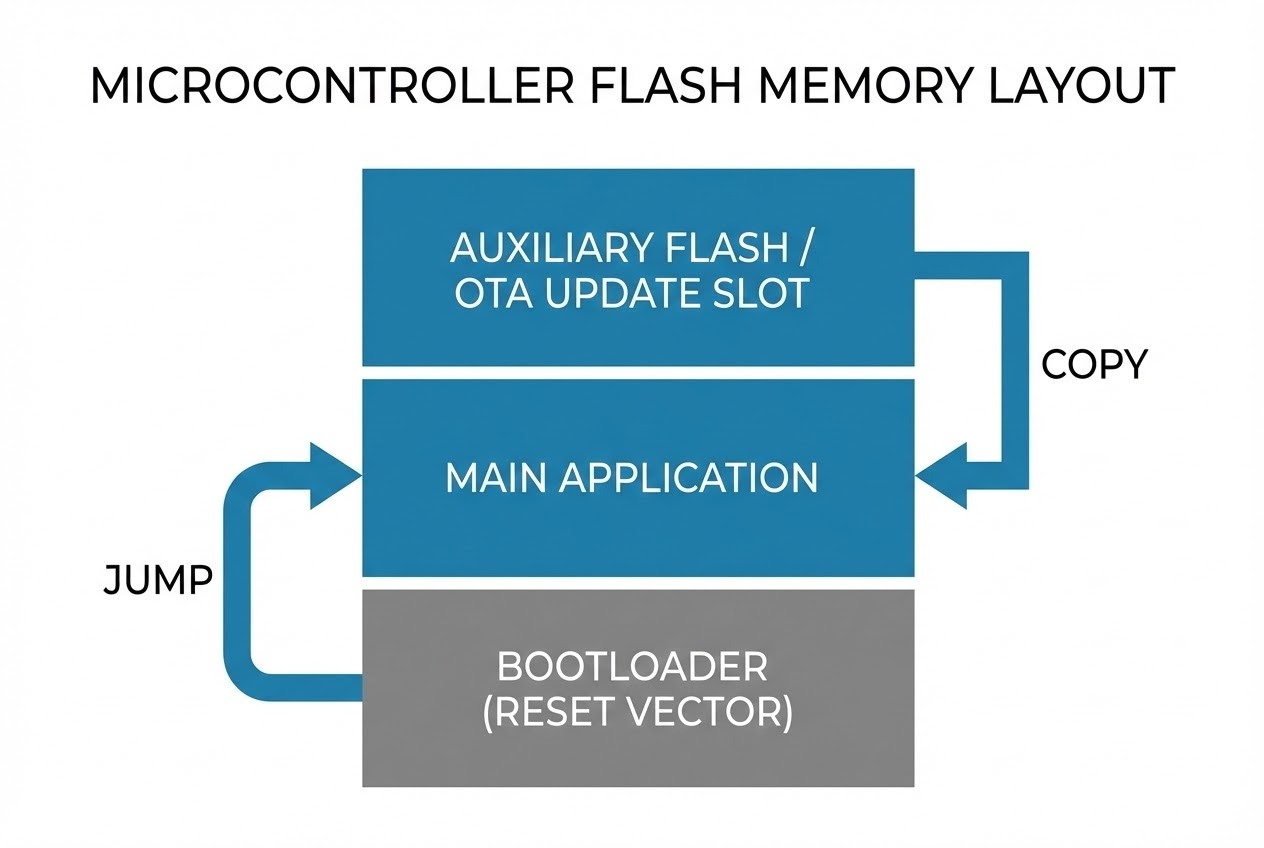
In the C standard, a freestanding environment lacks an OS to manage memory or load executables. Code execution always begins at the hardware-defined Reset Vector. By placing a Bootloader at the very beginning of the Program Memory (Flash), we essentially create a “Mini-OS” designed for a highly specific mission:
- The First Executable (The Gatekeeper): The Bootloader is always the first piece of code to run upon power-up or system reset. Its primary job is to ask a simple question: “Is there a new firmware version waiting to be updated?”
- Flexible Firmware Updates: If an update is triggered, the Bootloader waits to receive the new firmware payload via communication interfaces like UART, USB, I2C, or even fetches it over the internet (OTA - Over-The-Air) using an external module. Once received, it writes the new binary directly into the Flash memory.
- Branching to the Application (The Jump): If no update is required, or once an update is successfully flashed, the Bootloader sets the necessary flags and executes a “Jump” to the specific memory address of the main Application Code, handing over control.
- Auxiliary Flash Architecture (Background Downloads): In complex IoT systems, the main application remains running and communicates with the network to download the new firmware into a separate “Auxiliary Flash” (external memory). Once downloaded, the system reboots, and the Bootloader safely copies the verified data from the Auxiliary Flash into the internal Program Flash. This prevents device downtime during slow downloads.
- Secure Bootloader: Modern bootloaders do more than just copy bytes. They verify the integrity of the firmware using cryptographic Hashes (like SHA-256) and authenticate the source using Digital Signatures (Public Key Cryptography). This ensures the firmware hasn’t been tampered with by hackers and genuinely comes from the manufacturer.
Code Example: Bare-Metal Bootloader Jump
Let’s look at a conceptual Clean C code snippet demonstrating how a bootloader decides whether to update, verifies the firmware, and finally performs a bare-metal jump to the main application.
#include <stdint.h>
#include <stdbool.h>

/* Define the start address of the Main Application (Must match the App's Linker Script) */
#define APPLICATION_START_ADDRESS 0x08004000

/* External dummy functions for update logic and verification */
extern bool is_update_requested(void);
extern void download_and_flash_new_firmware(void);
extern bool verify_firmware_checksum(uint32_t address);

/* Function to perform the bare-metal jump to the Main Application */
static void jump_to_application(void) {
    /* 1. Fetch the Application's Reset_Handler address from its Vector Table */
    uint32_t app_reset_vector = *(volatile uint32_t *)(APPLICATION_START_ADDRESS + 4);

    /* 2. Create a Function Pointer to that address */
    void (*app_entry_point)(void) = (void (*)(void))app_reset_vector;

    /* 3. Relocate the Main Stack Pointer (MSP) to the App's starting stack address */
    /* Note: Usually done via inline assembly or CMSIS functions like __set_MSP() */
    // __set_MSP(*(volatile uint32_t *)APPLICATION_START_ADDRESS);

    /* 4. Branch to the Application! (Handing over the baton) */
    app_entry_point();
}

int main(void) {
    /* 🚀 Bootloader is the first thing running */

    if (is_update_requested()) {
        /* If an update flag is set, fetch and flash the new firmware */
        download_and_flash_new_firmware();
    }

    /* 🛡️ CRITICAL: Always verify the Checksum/Signature before executing */
    if (verify_firmware_checksum(APPLICATION_START_ADDRESS)) {
        /* Firmware is intact, jump to the application */
        jump_to_application();
    } else {
        /* Firmware is corrupted! Enter Recovery Mode or Halt */
        while(1) {
            // Blink Error LED & wait for a valid firmware payload over UART/USB
        }
    }

    return 0; /* In a freestanding environment, we should never reach here */
}
Best Practices & Hidden Dangers
Writing a bootloader is a high-stakes task. A single bug can turn your expensive custom board into a permanent “brick”! According to embedded software engineering standards, here are the critical pitfalls to avoid:
- The Fallback Lifeboat (A/B Updates): The biggest risk is a power outage while the bootloader is erasing or writing to the Flash memory. A robust system employs an A/B partition layout or keeps a “Factory Image” (Version N-1) in backup memory. If an update fails, the bootloader can restore the old version, preventing a totally bricked device.
- Interrupt Vector Relocation (VTOR): When the MCU boots, hardware interrupts are mapped to the Bootloader. Before jumping to the main application, you must tell the MCU core (e.g., via the
SCB->VTORregister in ARM Cortex-M) to relocate the Interrupt Vector Table to the Application’s address space. Otherwise, the first interrupt triggered by your app will crash the system by jumping back into the bootloader’s memory space! - Verify Before Run (Secure Boot): Never blindly trust downloaded code. Always use cryptography (Hashes and RSA/ECC Signatures) to verify the firmware before jumping to it. Additionally, ensure you lock down hardware debug interfaces (like JTAG/SWD) to prevent attackers from reading or bypassing your secure bootloader.
Conclusion
From a system environment perspective, a Bootloader fills the usability gap in a Freestanding Environment, giving it the flexibility typically reserved for Hosted Environments. It empowers simple microcontrollers to securely download and update themselves from across the globe (OTA), acting as the beating heart of modern IoT infrastructure.
If you are currently wrestling with Linker Scripts trying to partition memory for a custom bootloader, or if you’ve ever accidentally “bricked” a board (we’ve all been there 😅), drop by and share your war stories on our community board at www.123microcontroller.com! See you in the next article. Happy Coding!